
Showing posts with label Testing. Show all posts

Wednesday, July 1, 2015

Grading tests and the black pit of despair! BUT NO MORE!!!

Howdy! I am in the middle of a Kim Sutton Math Camp and am learning so much for my new grade level! My brain was spinning about what to share with you first! But, I wanted to back up and really dive into something I found last year but didn't get around to using. (You mean, we don't implement everything we find in the known teaching universe; immediately? The answer is.. sadly, no.) But I really got to thinking: I am going to have 3 classes of math and I want to be very efficient at providing test feedback rather quickly. I want to do ALOT of data tracking and self monitoring this year. In order for that to have any impact with these kids, they have to get feedback and as much as I can give!
So.... first problem I ran into was grading their tests. I tried to grade it as they turned it in, but then I got tied up with given testing accommodations ( oral admin or small group, etc) and when I tried to do both, my poor small group kiddos were interrupted up to 20 times during their test. Not good accommodating if you ask me! So I stopped grading immediately and my kids got into a bad habit of rushing and turning in sloppy work with loads of mistakes.
The second problem I found was when I had to wait to grade the tests, the feedback came way too late, sometimes days later. At that point, the mistakes wouldn't resonate with them and had little impact. Sadly, the test just became another boring worksheet.
At last!!! My suite mate from 3rd grade found this great app on Pinterest and sent it to me. Again, with all the fabulous new math objectives this past year, this was put on the back burner.

Here is a rundown for you. The app itself is called ZipGrade. It does have a free trial version where you get up to 100 scans free. Then it comes to a decision, to purchase or not to purchase? When you purchase, I believe it doesn't have a limit of scans anymore, It goes to a subscription for a period of time. I figured I'll give it a try the first test we take and go from there. So i downloaded the free app and started exploring. You will definitely want to set up a account, because it makes your data easily accessible in the app/computer. When you log in this is what you will see.
Below is a picture of  where I created my 3 classes.
Above: Picture of once you created a quiz and where your quizzes will be listed.

 This is the student section. All of these are fake students. I began with first and last names. I then started thinking about full student names with their grades easily seen (you will see that in a few minutes), I wanted to make it as private as I could without me needing a cipher to figure out whose data I was viewing. Play around with it and do what makes you feel comfortable. Everything about the student is editable. First and last name, ID, and Ext ID. I think I decided I am going to do 3 digit number for each student. For example: The first student alphabetically in my homeroom would get the number 101. The second, 102. The first student alphabetically in my 2nd class would be 201. Easily deciphered by me, and the kids won't see names immediately.
Moving on...
The next two pictures are views from when when you click on a specific class name under the Classes Tab. 
A view of the quizzes given for that particular class. And when you click on a specific quiz, it takes you to the picture below.
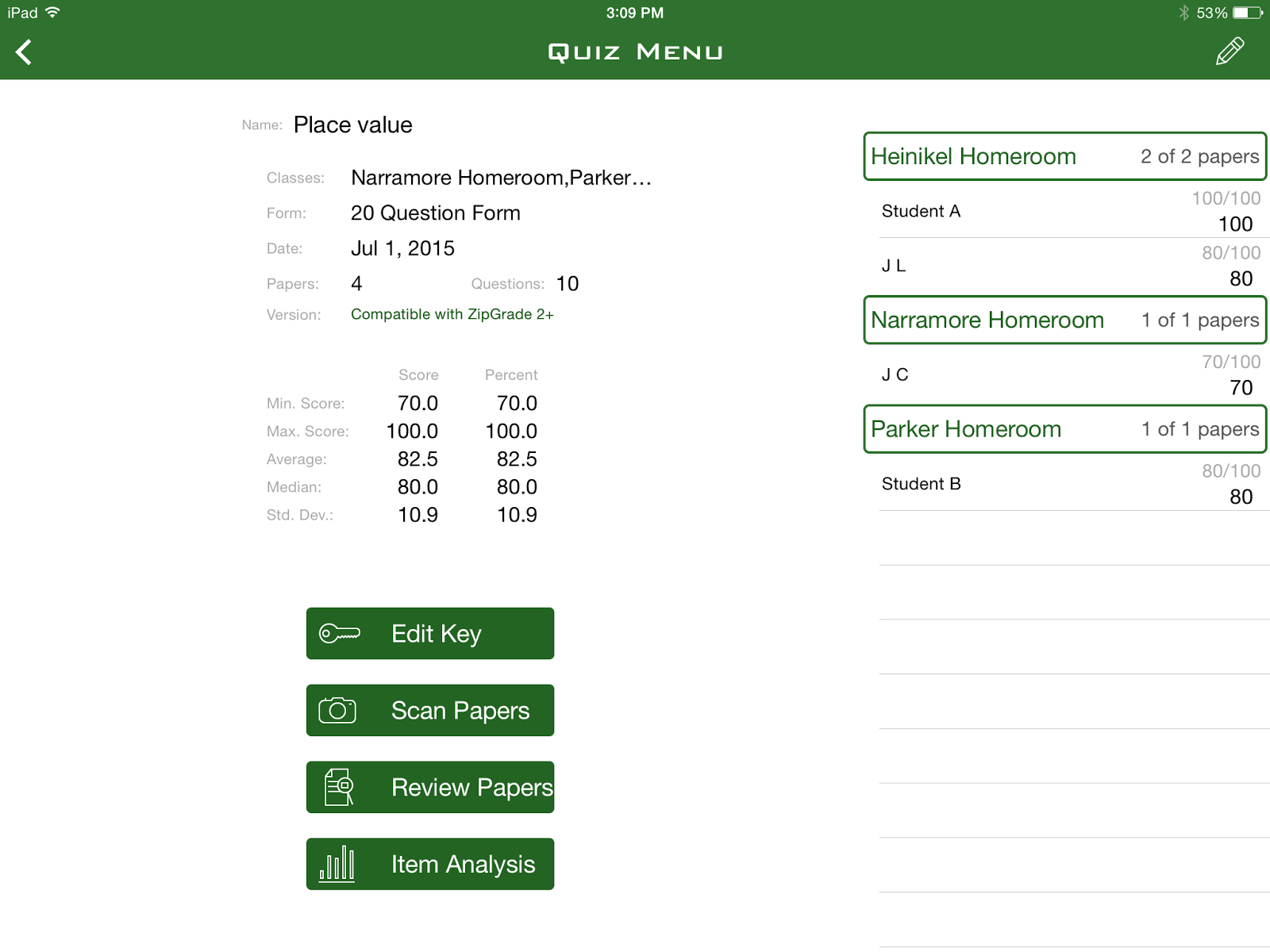
This is where you can see scanned in grades ( on the right). You can see stats. You can also edit/create your answer key, scan the papers, see bigger view of what is on the right side if this page already, or the glorious item analysis portion. Absolute GOLD, my friends! I'll get to that in a few moments.


This is the view when you click on  Classes, Students Tab. When you click on an individual student, it brings up this view...
Holy Moly Right?!?! All the tests taken by that particular student and their grade. OMG What great documentation that is easily accessible. Where have you been all my life?!
You can even go further into what question he/she got correct or incorrect! WOW! What a great tool!
Now here is the best part if you are a DATA DRIVEN teacher... The Item analysis portion. Once quizzes have bee graded (by ZipGrade NOT you) you can see the item analysis of your test. Here is what it looks like.
Draw back here... On the app, when I first had 12 questions and weighted them 8.3 each. It did some weird things and turned it into 8.300000000001 or something similar. Therefore I did my demonstration by an easy 10 question test. 
What easy feedback for planning purposes! When you click on a particular test question Zip Grade even breaks it down by student who got it correct and incorrect! There is your small grouping already done for you! 
My next post about this will be how the first test of the year went using this and some tweaks I want to make. Some things I still want to consider are:
  1. Will I have my students scan their own or will I scan it? 
  2. How will I have the students follow up after they have received their grade?
So there you go folks! I am telling you, download it and play around. They even give you the scantron to use. No creating the wheel! What are your thoughts on this app?


Saturday, April 27, 2013

STAAR Testing

Ok, it has been extremely long since my last post. BUT! It has been STAAR TESTING! Finally DONE!  I will say my kiddos worked their BOOTAY'S off! I hope the scores come back this school year!

Those testing days sure are stressful and LOOOOOONNNNNGGGG! But I wanted to share what I did for my students to pump them up!

Day 1 of Testing - Math
We had parents write a letter and send it back sealed. We left this note on their desk the first morning for them to read before they began testing.  The kids seemed proud that their parents words were with them.

I also  had little goodie bags waiting for them when they arrived the first morning. I used small white paper bags I found at Hobby Lobby and just a few necessities. 2 Pencils - the green one was what the school got for them and it had a motivational message about STAAR. The other pencil is just a little flag of my mustache duck tape! My kids are obsessed with duck tape this year... or should I say I am obsessed?? :) I also bought neon colored erasers from the dollar store. For some reason, this neon pink one doesn't look sooooo neon... oh well. We usually pass out snacks during the test, however I stuck this little jolly rancher inside.
Now, I also stuck a cute note explaining these items. You can get that here.
 
I also created my own note on strategies to remember.
 
 
Day 2 of Testing - READING
I had the kiddos put their supplies back in their goodie bag so I could sharpen pencils and replenish candy.
I also had them keep their parent letter on their desk so they could read them again.
At the last minute before the kids arrived I was panicked about how to pump them up for the reading part. I grabbed my green GLITTER, put it in a little cup and as they walked in the door, I tossed some GLITTER over their head and sang MAGIC BRAIN POWER! My kiddos probably thought I was nuts, but I wanted them to come in a little excited! I knew how tired they were from the day before.

That's all folks! :)
Coming this week - 30 Days Left! Activities - How to keep your kids motivated to have good behavior after the state testing is done!


Saturday, April 13, 2013

Standardized Testing---BLAHHHHHH

I might be crazy, but I am already thinking about next year and what changes I want to make for my instruction and classroom. Don't get me wrong, I am definitely loving this year!!! My kiddos are one of my best classes I have had. Reflecting back on this year, my head is spinning on what went great or what went not so great. I now have all these ideas swimming aroundin my head that I want to try out or be sure to implement. Hence why I started my own blog.
First Idea I need to get out -
Testing - Yes, 3rd grade in Texas has that good 'ole STAAR Test. Prepping my students for it ALL year is such a daunting task. You don't want to set them off early into high blood presssure land, but you want to make sure they understand the importance.   This year, I did my best not to shove the word STAAR down their throats.  As a result, I started to feel like my kiddos weren't too worried about how they did at all on any major assessment. AHHHHHH!!! right?    After having different meetings at school and talking with a broad range of subject area teachers, I pooled their ideas and created these ideas. 
  • Set goals for every assessment - This last unit test we took, I tried this idea out. I conferenced with EVERY student before the test. (34 to be exact, when you teach two math classes) I showed the student all of his/her previous test scores and asked them what they want to make on this test. Of course some of them answered enthusiasticly 100!!! And of course, some of your babies need a more realistic goal. I discussed that with them and we decided on a better choice if they needed. Now, don't stop there!!! Yes, an overall goal is important. However, I thought my students were ready to address their OWN mistakes. Now, as perfect I thought this was going to be, it wasn't as easy as I thought. I asked each child what  mistakes they know they make on their assignments to keep them from that 100! Many of them were very in tuned with themselves, and could answer as specifically as I add wrong sometimes, or I don't check my work against my answer. I WAS LIKE OMGGGGGGGGGGGG when this came out of my babies' mouths! I was so proud that they were aware of their own mistakes! But, there were a few that would say the standard "I didn't show my work", when indeed they did. Those were the ones that helped me come to the realization that if I had done this exercise from the very beginning of the year and continued it ALL year my students would be experts in learning from mistakes! So here are my ideas to help with this very important piece of teaching a testing grade level - setting goals and working toward them.
    • After the first few weekly tests I give at the beginning of the year, conference with the students and decide what mistakes are being made. Have them keep a journal/chart of some sort. On the first unit test, have them set a goal. ( Sometimes, I don't even discuss a grade goal, it would be goals like Finish the test in the time allowed.)  After the test, reward them if they met any goal they set.
    • Complete a test yourself the way you would want it to look. Be sure you use the strategies you are teaching to them. After the test, have the students analyze your test with theirs and journal what they didn't do for each problem they missed. You will have those friends that just use the standard  "didn't show work". Be sure you have them elaborate on this. They can't learn from the mistake if they truly don't know what they did wrong!! BE SURE TO CONFERENCE WITH THEM about this journal! They will need guidance with it the whole year!
Example: The sticky note was what I conferenced about with each student. they put it on their desk for reminders. This student wouldn't read carefully and make silly mistakes so her goal was to read every question twice!
 
Okay, okay I have now officially talked your ear off. Thanks for reading! See you back soon!